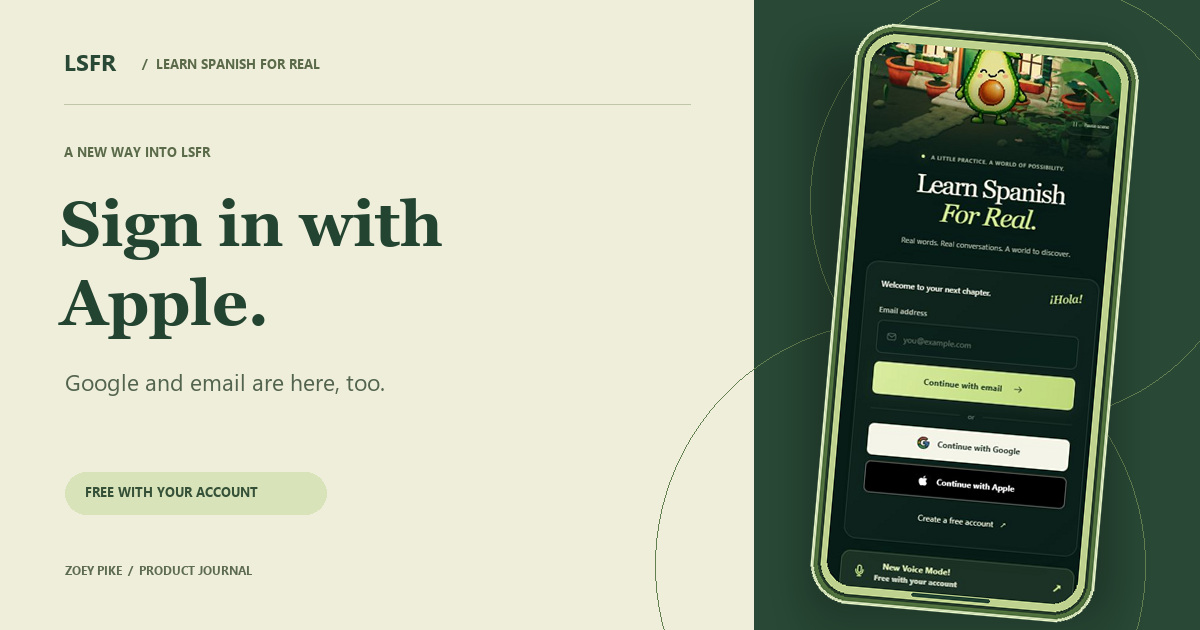
You open Learn Spanish For Real for a few minutes of Spanish. The welcome screen now gives you three ways in. Continue with Google, use your Apple Account, or sign in with email, then get back to learning with Avo.
Apple sign-in is the new arrival. It joins Google and email as another way to access LSFR, giving learners more choice over how they enter the app. If you already use an Apple Account for iCloud, you can use that account through the Apple sign-in option.
Apple sign-in comes to LSFR
Select Continue with Apple on LSFR and complete the prompt from Apple with the account you want to use. Sign in with Apple also works on websites in a browser, so you can follow that route when you open LSFR on the web. Apple explains how Sign in with Apple works.
If you use an iPhone, iPad, or Mac every day, that account may already be part of your routine. Apple sign-in brings it into LSFR without asking you to choose a separate LSFR password.
Continue with Google or email
Continue with Google lets you use a Google Account. If you use several accounts, pay attention to the one you select in Google’s prompt. Choosing the account you normally use for LSFR makes it easier to return to the profile you have been studying with.
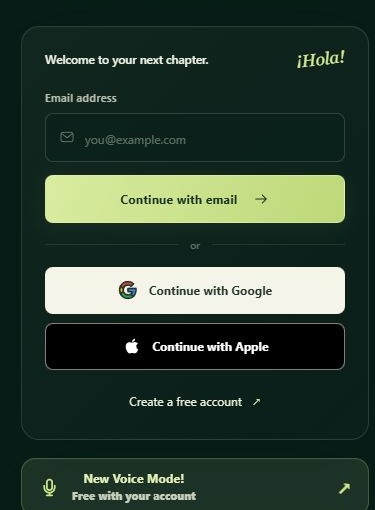
Email remains a direct route into your LSFR account, too. Enter your email address, select Continue with email, and follow the prompts. It is a useful choice if you prefer to keep a dedicated login for your Spanish practice. New learners can also choose Create a free account from the welcome screen.
A familiar sign-in process, with you in control
With Apple and Google, you complete the provider’s own sign-in step and follow any verification it asks for. Take a moment to check the account and information shown in that prompt before continuing. Google describes its sign-in system as a way for another app to authenticate you using your Google Account. Read Google’s guide to Sign in with Google.
Free Spanish lessons online, with somewhere to begin
If you are looking for free Spanish lessons online, you can begin with Interactive Voice Study and flashcard review on a free LSFR account. Flashcards use spaced repetition to bring vocabulary back for review, and Avo guides the spoken study sessions. There is also a free resource library open to all.
An account gives your study progress a place to build. A short session can be enough to revisit a few words in Daily Study or pick up the next part of a lesson. When you want to practice speaking, Avo can guide a voice session. Explore LSFR’s Interactive Voice Study.
Choose your way in
- Open Learn Spanish For Real in your browser.
- Select Continue with Apple or Continue with Google, or enter your email address and choose Continue with email.
- Complete the prompts for your chosen method, then head into your Spanish practice.
I’m Zoey Pike, the developer behind Learn Spanish For Real. Joining is free, and the welcome page asks for no credit card. Open LSFR and choose your sign-in method.
Explore the Learn Spanish For Real project and its development.
Pass it along.
A good read deserves good company.